Testing Contracts
As part of the Casper local Rust contract development environment, we provide an in-memory virtual machine and a testing framework against which you can run your contract. You do not need to set up a full node for testing. We provide a testing framework that simulates deploy execution, enables monitoring global state changes using assertions, and confirms a successful deploy of the smart contract.
Here is the main testing flow:
- Initialize the system and create a deploy
- Execute the deploy, which will call the smart contract
- Query the context for changes and verify that the result matches the expected values
It is also possible to build scripts with this environment and set up continuous integration for contract code. This environment enables the testing of blockchain-enabled systems from end to end.
Initialize the System and Create a Deploy
The following steps guide you through the initialization of the system and deploy creation.
Define Global Variables and Constants
You can use global variables and constants in later steps to derive values and create components.
Global Variables and Constants
The framework uses global variables and constants to find the compiled WASM file and to create the deploy.
use std::path::PathBuf;
const MY_ACCOUNT: [u8; 32] = [7u8; 32];
const KEY: &str = "my-key-name";
const VALUE: &str = "hello world";
const RUNTIME_ARG_NAME: &str = "message";
const CONTRACT_WASM: &str = "contract.wasm";
KEYandVALUE: These constants are the global states we are using to test whether the deploy has been executed correctly. KEY acts as the input to the assertion and VALUE acts as the output from the assertionPathBuff: The contract uses this variable to find the compiled WASM fileRUNTIME_ARG_NAMEandCONTRACT_WASM: Variables used to build the deploy
Import Builders and Constants
We derive imports from the dependencies in the Cargo.toml file. If you see problems while importing, fix the dependency settings in the Cargo.toml file.
use casper_engine_test_support::{
    DeployItemBuilder, ExecuteRequestBuilder, InMemoryWasmTestBuilder,
    ARG_AMOUNT, DEFAULT_ACCOUNT_ADDR, DEFAULT_ACCOUNT_INITIAL_BALANCE, DEFAULT_GENESIS_CONFIG, DEFAULT_PAYMENT,  DEFAULT_RUN_GENESIS_REQUEST,
};

use casper_types::{
    account::AccountHash, runtime_args, Key, PublicKey, RuntimeArgs, SecretKey, U512,
};
Create a Deploy Item
The testing framework uses the DeployItem to derive the ExecuteRequest to send to the test contract.
Declaring Local Variables
These are the variables used to construct the deploy_item.
let secret_key = SecretKey::ed25519_from_bytes(MY_ACCOUNT).unwrap();
let public_key = PublicKey::from(&secret_key);
let account_addr = AccountHash::from(&public_key);
let session_code = PathBuf::from(CONTRACT_WASM);
let session_args = runtime_args! {
            RUNTIME_ARG_NAME => VALUE,
};
Variable details
secret_keyandpublic_key: Derives the account addressaccount address: Gets authorization key and locationsession_code: Gets the path to your actual contract WASM file on your systemsession_args: Gets the values of runtime arguments
Create Deploy Item
Before deploying the contract in the framework, you need to have a Deploy Item to send to the request. DeployItemBuilder will directly instantiate the deploy item using associate builder methods.
let deploy_item = DeployItemBuilder::new()
    .with_empty_payment_bytes(runtime_args! {ARG_AMOUNT => *DEFAULT_PAYMENT})
    .with_session_code(session_code, session_args)
    .with_authorization_keys(&[account_addr])
    .with_address(account_addr)
    .build();
Constructor methods
The deploy item contains the following elements:
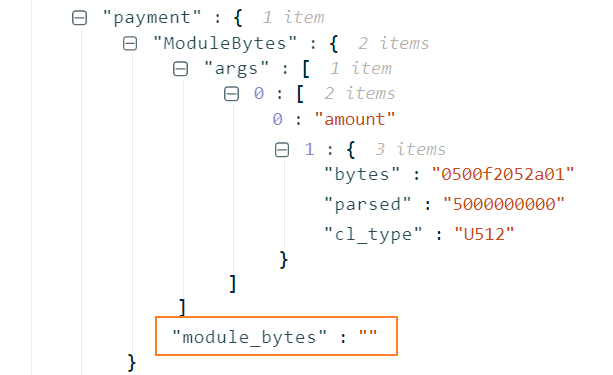
payment details: This can be standard payments or custom payments. Standard payment is the bare payment amount a user wishes to pay for the deploy. Custom payment comes with payment codes or functions that indicate payments by module bytesempty_payment_bytes implies the module bytes inside the deploy item's payment part are empty. It directs the framework to use the standard payment contract that is the original amount (DEFAULT_PAYMENT)
session_code: Sets the session code for the deploy using session_code and session_args- PathBuff : Helps to find the compiled WASM file in your WASM directory. This is a mutable path with some extended functionalities
authorization_keys: Sets authorization keys to authorize the deploy. To check the list of keys that authorize the call. See: Permissions model.address: Sets the address of the deploy
Deploy the Smart Contract
Follow these steps to deploy the smart contract:
Create the Builder
InMemoryWasmTestBuilder is the builder for a simple WASM test that uses the state held entirely in memory. It provides methods to simulate deploys to the blockchain array and make queries to whatever state you find in the global state.
let mut builder = InMemoryWasmTestBuilder::default();
        builder.run_genesis(&DEFAULT_RUN_GENESIS_REQUEST).commit();
Genesis : run_genesis call will initialize the blockchain network to get your first block. When you initialize a blockchain network, there needs to be a genesis block as a starting point to the incoming blocks. The subsequent set of deploys will execute after the execution of the genesis block.
Create an Execute Request
After creating the deploy_item, wrap it in an ExecuteRequest created by the ExecuteRequestBuilder; then, the builder instance will construct the deploy item and return the execute_request.
let execute_request = ExecuteRequestBuilder::from_deploy_item(deploy_item).build();
Deploy the Contract
InMemoryWasmTestBuilder instance will execute the execute_request, which carries the deploy details.
builder.exec(execute_request).expect_success().commit();
Builder methods
commit()- This will process the execution result of the previous execute_request on the latest post-state hash, which is the hash function's outputexpect_success()- This will assert the deploy as a successful execution. If it is not successful, it will crash the test
Query and Assert
This is the final step of the test contract execution. In this step, you will create a query result to send to post-assertion, and execute the deploy using the previously created components and finally perform the post-assertion to confirm the expected change on the test contract.
Query and assertion steps are as below:
The smart contract creates a new value hello world under the KEY, my-key-name. You can extract this value from the global state of the blockchain using the query_result.
Pre-Assert the Status
Pre-assertions are helpful to confirm the existing state has not changed before the test execution. To accomplish this, create a query result using the builder and assert that the result of the query should not be equal to the value of KEY.
  let result_of_query = builder.query(None, Key::Account(account_addr), &[KEY.to_string()]);
  assert!(result_of_query.is_err());
Method query() is to query the state for a stored value, KEY in this sample.
Parameters
maybe_post_state: Not defined in this casebase_key: Contact where you find the named-key - here default addresspath: Global KEY constant
Deploy the Contract
Deploy is done by executing the previously created execute_request instance.
builder.exec(execute_request).expect_success().commit();
Post-Assertion to Confirm Deploy
This will query the post-deploy value and assert for its change.
  let result_of_query = builder
            .query(None, Key::Account(account_addr), &[KEY.to_string()])
            .expect("should be stored value.")
            .as_cl_value()
            .expect("should be cl value.")
            .clone()
            .into_t::<String>()
            .expect("should be string.");
Builder methods
query(): Queries the state for a given valueexpect(): Validates the query which contains the output message. This will unwrap the value; the test will panic and crash if the value can't be unwrapped. The string value inside the argument will output as the reason to crashas_cl_value(): Returns a wrapped CLValue if this is a CLValue variantclone(): Breaks the reference to the CLValue so that it will provide brand new CLValueInto_t(): Converts the CLValue back to the original type (i.e., a String type in this sample). Note that theexpected_valueis aStringtype lifted to theValuetype. It is also possible to mapreturned_valueto theStringtype
Assertion
Assert that the query's result matches the expected value; here, the expected value is "hello world".
assert_eq!(result_of_query, VALUE);
Final Test Sample
The code below is the simple test generated by cargo-casper (found in tests/src/integration_tests.rs of a project created by the tool).
#[cfg(test)]
mod tests {
   use casper_engine_test_support::{
        DeployItemBuilder, ExecuteRequestBuilder, InMemoryWasmTestBuilder, ARG_AMOUNT,
        DEFAULT_ACCOUNT_ADDR, DEFAULT_ACCOUNT_INITIAL_BALANCE, DEFAULT_GENESIS_CONFIG,
        DEFAULT_PAYMENT, DEFAULT_RUN_GENESIS_REQUEST,
    };
    use casper_types::{
        account::AccountHash, runtime_args, Key, PublicKey, RuntimeArgs, SecretKey, U512,
    };
    use std::path::PathBuf;
const MY_ACCOUNT: [u8; 32] = [7u8; 32];
    // Define `KEY` constant to match that in the contract.
    const KEY: &str = "my-key-name";
    const VALUE: &str = "hello world";
    const RUNTIME_ARG_NAME: &str = "message";
    const CONTRACT_WASM: &str = "contract.wasm";
#[test]
    fn should_store_hello_world() {
        let secret_key = SecretKey::ed25519_from_bytes(MY_ACCOUNT).unwrap();
        let public_key = PublicKey::from(&secret_key);
        let account_addr = AccountHash::from(&public_key);
        let session_code = PathBuf::from(CONTRACT_WASM);
        let session_args = runtime_args! {
            RUNTIME_ARG_NAME => VALUE,
        };
let deploy_item = DeployItemBuilder::new()
            // .with_payment_bytes(module_bytes, args)
            .with_empty_payment_bytes(runtime_args! {
                ARG_AMOUNT => *DEFAULT_PAYMENT
            })
            .with_session_code(session_code, session_args)
            .with_authorization_keys(&[account_addr])
            .with_address(account_addr)
            .build();
let execute_request = ExecuteRequestBuilder::from_deploy_item(deploy_item).build();
let mut builder = InMemoryWasmTestBuilder::default();
        builder.run_genesis(&DEFAULT_RUN_GENESIS_REQUEST).commit();
// prepare assertions.
        let result_of_query = builder.query(None, Key::Account(account_addr), &[KEY.to_string()]);
        assert!(result_of_query.is_err());
// deploy the contract.
        builder.exec(execute_request).expect_success().commit();
// make assertions
        let result_of_query = builder
            .query(None, Key::Account(account_addr), &[KEY.to_string()])
            .expect("should be stored value.")
            .as_cl_value()
            .expect("should be cl value.")
            .clone()
            .into_t::<String>()
            .expect("should be string.");
assert_eq!(result_of_query, VALUE);
    }
}

fn main() {
    panic!("Execute "cargo test" to test the contract, not "cargo run".");
}
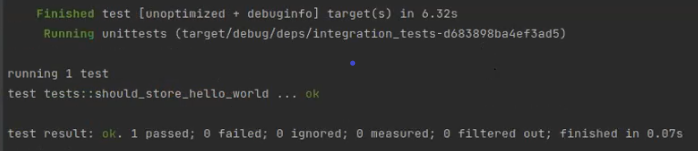
You can see the result of the above test in this screen capture: