Contract Deployment
Now that you have implemented the smart contract for ERC-20, it's time to deploy it to the blockchain. Deploying the ERC-20 contract is similar to deploying other smart contracts, while only the WASM files and parameters will differ. Refer to the Deploying Contracts section to learn more about overall contract deployment.
Let's dive into the deployment process.
Pre-requisites
- Set up your machine as per the prerequisites
- Ensure you have an Account, the associated key pair, and the required amount of tokens to perform the deploy
- Ensure your account contains enough
CSPR Tokensto perform the execution. -CSPR Tokens are used to pay for the transactions on the Casper Network. Follow the transfer tokens guide to learn more about token transferring on the Casper Testnet - Install Casper client to interact with the network
Basic Flow
Here are the basic steps to deploy the ERC-20 contract on the Casper Network.
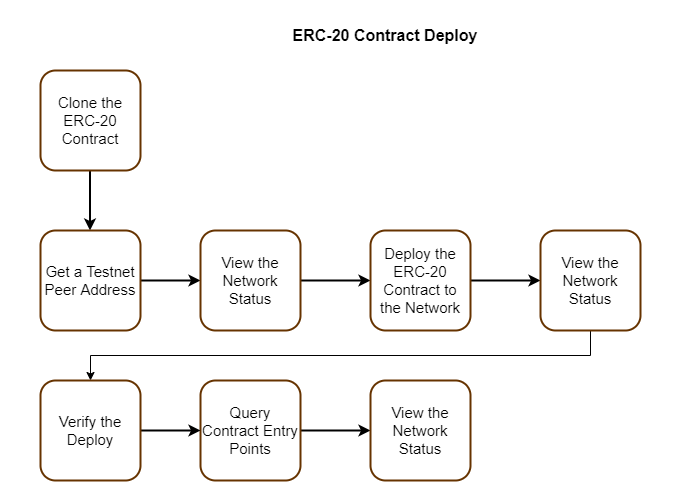
Cloning the ERC-20 Contract
This step includes cloning and preparing the ERC-20 contract for the deployment.
- Clone the ERC-20 contract from the repository
git clone https://github.com/casper-ecosystem/erc20.git
- Move to the newly created folder and compile the contract to create the target WASM file and build the WASM
cd erc20
make prepare
make build-contracts
- Build and verify the compiled contract
make test
Getting an IP Address from a Testnet Peer
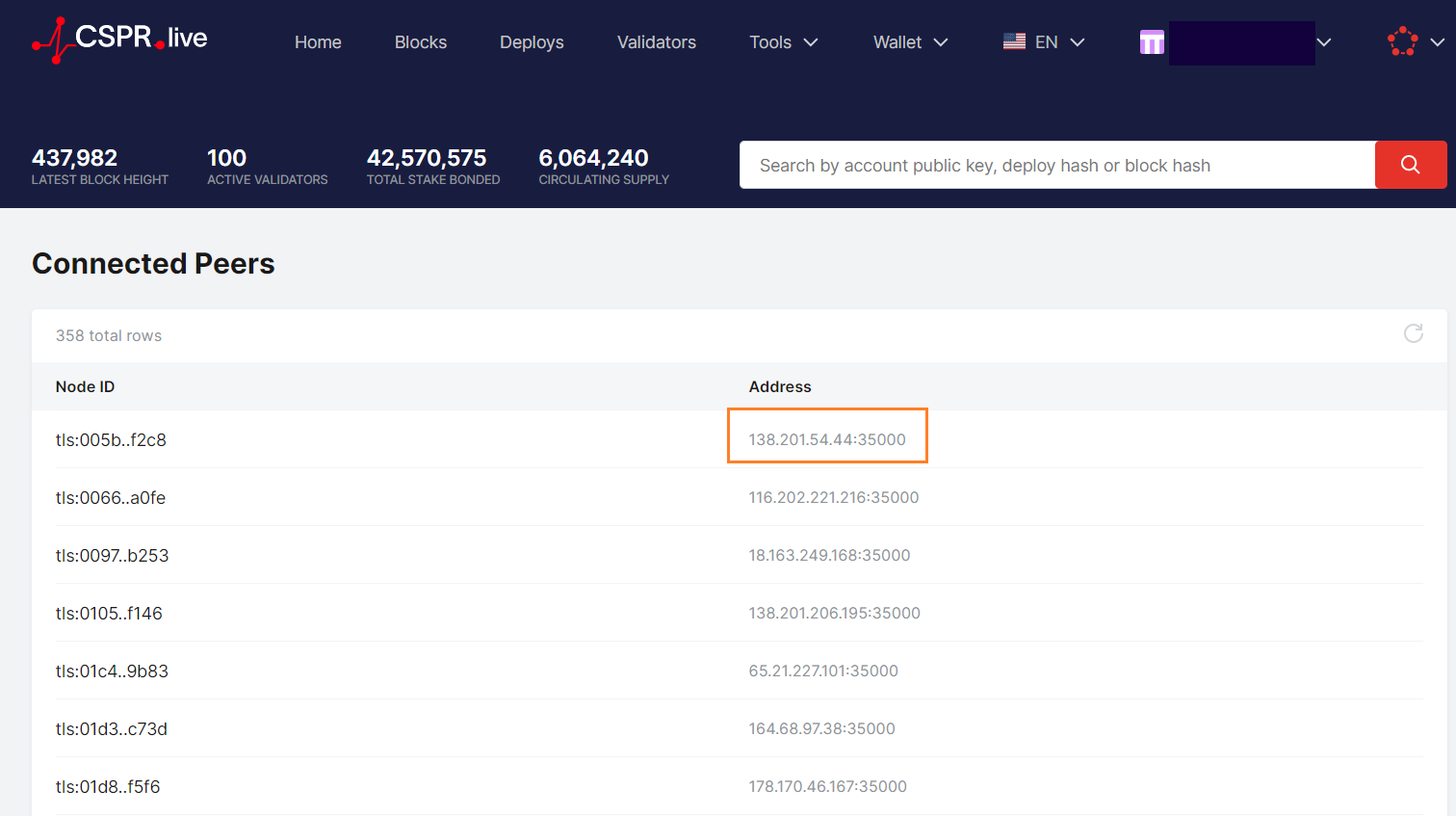
Use the acquire node address section to get a node-ip-address. We use peers on Testnet since we are deploying to the Testnet. Select a peer address from the list and do the address format as below,
note
Acquire a node address from the Testnet and use port '7777' instead of '35000' to send your deploy. If the selected peer is unresponsive, pick a different peer and try again
A list of peers from Testnet :
Viewing the Network Status
This query captures any information related to the state of the blockchain at the specific time denoted by the network's state root hash. You need to have the state root hash and the account hash to run the query.
Getting the state root hash
This marks a snapshot of the network state at a moment in time.
casper-client get-state-root-hash --node-address http://<HOST:PORT>
<HOST:PORT>: Use the Node IP address taken from a Testnet peer
Getting the account hash
Run the following command and supply the path to your public key in hexadecimal format to get the account hash.
casper-client account-address --public-key "[PATH_TO_YOUR_KEY]/public_key_hex"
Querying the network state
Use the command template below to query the network status with regard to your account.
casper-client query-global-state \
--node-address http://<HOST:PORT> \
--state-root-hash [STATE_ROOT_HASH] \
--key [ACCOUNT_HASH]
Deploying the Contract
Now you can deploy the contract on the network and check how it behaves. Use the following command template to deploy the contract:
casper-client put-deploy \
    --node-address http://<HOST:PORT> \
    --chain-name [NETWORK_NAME]] \
    --secret-key [PATH_TO_YOUR_KEY]/secret_key.pem \
    --payment-amount [AMOUNT] \
    --session-path [WASM_FILE_PATH]/[File_Name].wasm
NETWORK_NAME: Use the relevant network name. Here we use 'casper-test'PATH_TO_YOUR_KEY: Replace this with the actual path of your secret keyPAYMENT_AMOUNT: Gas amount in tokens needed for contract execution. If there are no adequate tokens, the deploy will not execute and return an errorWASM FILE PATH: The session-path argument should point to the location of your compiled ERC-20 WASM file
note
If you are performing the deploy on the Mainnet, we recommend trying several put deploys on the Testnet to understand the exact amount required for that deploy. Refer to the note about gas price to understand more about payment amounts and gas price adjustments
We currently do not refund any tokens as part of a deploy.
Eg:- If you spend 10 CSPR for the deployment and it only costs 1 CSPR, you will not receive the extra 9 CSPR. Refer to the computational cost and gas amounts for further details
Find the sample put-deploy command below:
casper-client put-deploy \
--node-address http://95.216.24.237:7777 \
--chain-name casper-test \
--secret-key "/home/ubuntu/secret_key.pem" \
--payment-amount 1000000 \
--session-path "<machine-path>/erc20/target/wasm32-unknown-unknown/release/erc20_test.wasm"
Querying the Network Status
You need to get the newest state root hash to view the network status because it has changed with the deploy. The account hash remains the same since you are using the same account. Follow the View the network state to execute this step with the new state root hash.
Verifying the Deploy
Now you can verify the applied deploy using the get deploy command. This will output the details of the applied deploy.
casper-client get-deploy \
--node-address http://<HOST:PORT> [DEPLOY_HASH]
Querying with Arguments
This step will narrow down the context and check the status of a specific entry point. You will use the details inside the erc20 contract to derive arguments. :::
Use the command template below to query the network state with arguments:
casper-client query-global-state \
--node-address http://<HOST:PORT> \
--state-root-hash [STATE_ROOT_HASH] \
--key [ACCOUNT_HASH] \
-q "[CONTRACT_NAME/ARGUMENT]"
Sample Deploy on Testnet
The following steps will guide you through the process with actual values and results.
Cloning the ERC-20 Contract
git clone https://github.com/casper-ecosystem/erc20.git
Getting an IP Address from a Testnet Peer
Use peers site to get the node ip address. Eg: http://95.216.24.237:7777
Viewing the Network Status
Here is the command to query the state of the network:
casper-client query-global-state \
--key account-hash-<account-address> \
--node-address http://<HOST:PORT> \
--state-root-hash E5B679BD1562fE6257257F5f969A79482E8DCEBBD501501BfA6d5844b61cBE3f
Result:
This result contains the network state before the deploy. You can see the named-key field is empty since we haven't sent the deploy to the network yet.
Result from querying the network status
{
  "id": 401803927542812599,
  "jsonrpc": "2.0",
  "result": {
    "api_version": "1.4.3",
    "merkle_proof": "[25564 hex chars]",
    "stored_value": {
      "Account": {
        "account_hash": "account-hash-<account-address> ",
        "action_thresholds": {
          "deployment": 1,
          "key_management": 1
        },
        "associated_keys": [
          {
            "account_hash": "account-hash-<account-address> ",
            "weight": 1
          }
        ],
        "main_purse": "uref-<hash>",
        "named_keys": []
      }
    }
  }
}
Deploying the Contract
Deploy the contract with this command:
casper-client put-deploy \
--node-address http://<HOST:PORT>  \
--chain-name casper-test \
--secret-key "/home/ubuntu/secret_key.pem" \
--payment-amount 1000000 \
--session-path "<machine-path>/erc20/target/wasm32-unknown-unknown/release/erc20_test.wasm"
Result:
This command execution will output the deploy_hash of the applied deploy. We can use the deploy_hash to get the details of the deploy.
{
  "id": 931694842944790108,
  "jsonrpc": "2.0",
  "result": {
    "api_version": "1.4.3",
    "deploy_hash": "b00E59f8aBA5c7aB9...."
  }
}
Viewing the Deploy Details
You can view the details of the applied deploy using the command below:
casper-client get-deploy \
--node-address http://<HOST:PORT> \
b00E59f8aBA5c7aB9.....
Result:
This contains the header, payment, and session details along with the execution results.
- If the execution result field appears as
"execution_results":[], it means that the deploy hasn't been executed yet. The time to load the execution result may vary depending on the network.
Result from querying the deploy
{
{
"id": -870982079597140956,
"jsonrpc": "2.0",
"result": {
"api_version": "1.4.3",
"deploy": {
"approvals": [
{
"signature": "[130 hex chars]",
"signer": "017B8CE645c728......................."
}
],
"hash": "F9D4C649Fa78Da07E.......................",
"header": {
"account": "017B8CE645c7285.......................",
"body_hash": "8eAEd6B7bCBB493d75d.......................",
"chain_name": "casper-test",
"dependencies": [],
"gas_price": 1,
"timestamp": "2022-01-04T15:14:29.203Z",
"ttl": "30m"
},
"payment": {
"ModuleBytes": {
"args": [
[
"amount",
{
"bytes": "0500e8764817",
"cl_type": "U512",
"parsed": "100000000000"
}
]
],
"module_bytes": ""
}
},
"session": {
"ModuleBytes": {
"args": [],
"module_bytes": "[417800 hex chars]"
}
}
},
"execution_results": [
{
"block_hash": "d3644f0306F20fa6.......................",
"result": {
"Success": {
"cost": "45040980830",
"effect": {
"operations": [],
"transforms": [
{
"key": "hash-8cf5E4aCF51f54Eb5.......................",
"transform": "Identity"
},
{
"key": "hash-624dBE2395b9D9503FB.......................",
"transform": "Identity"
},
{
"key": "hash-010c3Fe81B7b862E50C77.......................",
"transform": "Identity"
},
{
"key": "hash-9824d60dC3A5c44A20b.......................",
"transform": "Identity"
},
{
"key": "balance-C051e7EC16e08De.......................",
"transform": "Identity"
},
{
"key": "balance-98d945f5324F865243.......................",
"transform": "Identity"
},
{
"key": "balance-C051e7EC16e08Def8b556",
"transform": {
"WriteCLValue": {
"bytes": "06E07f3abEa001",
"cl_type": "U512",
"parsed": "1789897900000"
}
}
},
{
"key": "balance-98d945f5324F865243B7c02C0417AB6eaC361c5c56602FD42ced834a1Ba201B6",
"transform": {
"AddUInt512": "100000000000"
}
},
{
"key": "uref-d29a34C29769D4BaC250CF9efD3c6372d8e6a89B62fAD122b3BF009990Ae61CD-000",
"transform": {
"WriteCLValue": {
"bytes": "",
"cl_type": "Unit",
"parsed": null
}
}
},
{
"key": "account-hash-7f4bf39A3...................................................",
"transform": {
"AddKeys": [
{
"key": "uref-d29a34C29769D4BaC250CF9efD3c6372d8e6a89B62fAD122b3BF009990Ae61CD-007",
"name": "balances"
}
]
}
},
{
"key": "uref-075874B98e3CF57Ea6326746336A0Aa908e770D3ADe0cf953f7E146f8B64F837-000",
"transform": {
"WriteCLValue": {
"bytes": "",
"cl_type": "Unit",
"parsed": null
}
}
},
{
"key": "account-hash-7f4bf39A311...................................................",
"transform": {
"AddKeys": [
{
"key": "uref-075874B98e3CF57Ea6326746336A0Aa908e770D3ADe0cf953f7E146f8B64F837-007",
"name": "allowances"
}
]
}
},
{
"key": "uref-66Bf928E1F6A28b174A48Fca4c002Bc8b77Dd851d7EFFb9Dc1A450cB211E484a-000",
"transform": {
"WriteCLValue": {
"bytes": "0400ca9A3B",
"cl_type": "U256",
"parsed": "1000000000"
}
}
},
{
"key": "uref-4EB0a2A42afBb1d3D5ae9BD4781dc96E528C7AD3f0eEC240Cf1DbDaDF4f3D486-000",
"transform": {
"WriteCLValue": {
"bytes": "0A00000043617370657254657374",
"cl_type": "String",
"parsed": "CasperTest"
}
}
},
{
"key": "uref-6e87fd661D5a65aF95f02baDfEb64f8E0F44C006661d4903A68E9dF8dEAa413d-000",
"transform": {
"WriteCLValue": {
"bytes": "050000004353505254",
"cl_type": "String",
"parsed": "CSPRT"
}
}
},
{
"key": "uref-aCA2425C80584391fB883603460578B1472d13a429Ebbd1a18a55cE19cE8F3C6-000",
"transform": {
"WriteCLValue": {
"bytes": "08",
"cl_type": "U8",
"parsed": 8
}
}
},
{
"key": "dictionary-baA61231F04B1c2Ee97025f425eaD2F70CAd9c1E8c24355246d159038AdCb2e9",
"transform": {
"WriteCLValue": {
"bytes": "[188 hex chars]",
"cl_type": "Any",
"parsed": null
}
}
},
{
"key": "account-hash-7f4bf39A311a7538d8C...................................................",
"transform": "Identity"
},
{
"key": "account-hash-7f4bf39A311a75...................................................",
"transform": {
"WriteAccount": "account-hash-7f4bf39A311a7538d8C91BB86C71DF774023e16bc4a70ab7e4e8AE77DbF2Ef53"
}
},
{
"key": "account-hash-7f4bf39A311a7538...................................................",
"transform": "Identity"
},
{
"key": "account-hash-7f4bf39A311a7538d8C...................................................",
"transform": {
"WriteAccount": "account-hash-7f4bf39A311a75..................................................."
}
},
{
"key": "uref-868c0e0BEB2EB3C10e893be96E6D6bE7FC6375f3f038e46c3262509245c117a0-000",
"transform": {
"WriteCLValue": {
"bytes": "",
"cl_type": "Unit",
"parsed": null
}
}
},
{
"key": "hash-28f982A396052b5068383E725ab48965AB941167f53DB36a0911ba0C98bc39F0",
"transform": "WriteContractPackage"
},
{
"key": "hash-28f982A396052b5068383E725ab48965AB941167f53DB36a0911ba0C98bc39F0",
"transform": "Identity"
},
{
"key": "hash-AdF81845d77907054ACb250c196392c7DAEE5481d4EabEB76c318A307c11E5cB",
"transform": "WriteContractWasm"
},
{
"key": "hash-Faa81ED758ecE1B99E2Ce48073D13D7f6185d9dc5233E39DE5c192Bebb9483D6",
"transform": "WriteContract"
},
{
"key": "hash-28f982A396052b5068383E725ab48965AB941167f53DB36a0911ba0C98bc39F0",
"transform": "WriteContractPackage"
},
{
"key": "account-hash-7f4bf39A311a7538d8...................................................",
"transform": {
"AddKeys": [
{
"key": "hash-Faa81ED758ecE1B99E2Ce48073D13D7f6185d9dc5233E39DE5c192Bebb9483D6",
"name": "test_contract"
}
]
}
},
{
"key": "uref-66Bf928E1F6A28b174A48Fca4c002Bc8b77Dd851d7EFFb9Dc1A450cB211E484a-000",
"transform": "Identity"
},
{
"key": "dictionary-04932d42aff9367579770E219ce1C4Da83D1Fd42Fa0FaA4Ae98AE07914c4c1E4",
"transform": {
"WriteCLValue": {
"bytes": "[186 hex chars]",
"cl_type": "Any",
"parsed": null
}
}
},
{
"key": "uref-66Bf928E1F6A28b174A48Fca4c002Bc8b77Dd851d7EFFb9Dc1A450cB211E484a-000",
"transform": {
"WriteCLValue": {
"bytes": "04400cAa3b",
"cl_type": "U256",
"parsed": "1001000000"
}
}
},
{
"key": "uref-66Bf928E1F6A28b174A48Fca4c002Bc8b77Dd851d7EFFb9Dc1A450cB211E484a-000",
"transform": "Identity"
},
{
"key": "dictionary-Ec3f20485A29255dd2c2D7b8c008207A0d139dFDCE89224DA8b63F21c157A97F",
"transform": {
"WriteCLValue": {
"bytes": "[186 hex chars]",
"cl_type": "Any",
"parsed": null
}
}
},
{
"key": "uref-66Bf928E1F6A28b174A48Fca4c002Bc8b77Dd851d7EFFb9Dc1A450cB211E484a-000",
"transform": {
"WriteCLValue": {
"bytes": "04C090c83b",
"cl_type": "U256",
"parsed": "1003000000"
}
}
},
{
"key": "deploy-F9D4C649Fa78Da...................................................",
"transform": {
"WriteDeployInfo": {
"deploy_hash": "F9D4C649Fa78Da07Ec6EFcFC615ff1Bd3B68347750FA0C81B6a74C3f9582d7E4",
"from": "account-hash-7f4bf39A311a...................................................",
"gas": "45040980830",
"source": "uref-C051e7EC16e08Def8b556F9...................................................",
"transfers": []
}
}
},
{
"key": "balance-98d945f5324F865243B7c02C0417AB6eaC361c5c56602FD42ced834a1Ba201B6",
"transform": "Identity"
},
{
"key": "hash-8cf5E4aCF51f54Eb59291599187838Dc3BC234089c46fc6cA8AD17e762aE4401",
"transform": "Identity"
},
{
"key": "hash-010c3Fe81B7b862E50C77EF9A958a05BfA98444F26f96f23d37A13c96244cFB7",
"transform": "Identity"
},
{
"key": "hash-9824d60dC3A5c44A20b9FD260a412437933835B52Fc683d8AE36e4ec2114843e",
"transform": "Identity"
},
{
"key": "balance-98d945f5324F865243B7c02C0417AB6eaC361c5c56602FD42ced834a1Ba201B6",
"transform": "Identity"
},
{
"key": "balance-c69d353A5a3b6433368A8FC2F6b308ce4Ec10291782f61BA15C96F260f91FFC0",
"transform": "Identity"
},
{
"key": "balance-98d945f5324F865243B7c02C0417AB6eaC361c5c56602FD42ced834a1Ba201B6",
"transform": {
"WriteCLValue": {
"bytes": "00",
"cl_type": "U512",
"parsed": "0"
}
}
},
{
"key": "balance-c69d353A5a3b6433368A8FC2F6b308ce4Ec10291782f61BA15C96F260f91FFC0",
"transform": {
"AddUInt512": "100000000000"
}
}
]
},
"transfers": []
}
}
}
]
}
}
Querying Contract Entry Points
We will query the argument 'name' in this example.
casper-client query-global-state --node-address http://95.216.24.237:7777 \
--state-root-hash D00dF8c35B0E9995c2911803F37A212d82c960D9bC5bA3C4F99a661e18D09411 \
--key account-hash-7f4bf39A311a7538d8C91BB86C71DF774023e16bc4a70ab7e4e8AE77DbF2Ef53 \
-q "test_contract/name"
Result:
You can see that the name is CasperTest in this example.
{
 "id": -3650676146668320186,
 "jsonrpc": "2.0",
 "result": {
  "api_version": "1.4.3",
  "block_header": null,
  "merkle_proof": "[80252 hex chars]",
  "stored_value": {
   "CLValue": {
    "bytes": "0A00000043617370657254657374",
    "cl_type": "String",
    "parsed": "CasperTest"
   }
  }
 }
}